This week I made a google drawing about popcorn and popcorn drawings.
I used shapes, colors, and polyline. This activity was very fun and intresting to make.
I hope you liked this poster.
This week I made a google drawing about popcorn and popcorn drawings.
I used shapes, colors, and polyline. This activity was very fun and intresting to make.
I hope you liked this poster.
This week for Cybersmart, we used shapes, colors, polyline, and heaps of othe shapes on google draw.
First we made a google draw and made our own polyline mountains. We had some inspo with colors and I decided to make papatuanuku for some fun and it turned out to be really succsesful.
Then, we added our own made stars with polyline and shapes. This activity was super fun and brought out everybodys creativity.
I hope you can make one like this and hope you would enjoy it as much as I did.
I suggest you use: Polyline, Line, Shapes, Colors, Format options, Reflections, Frop shadow, and fun.
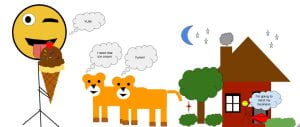
Today for Cybersmart, I made shapegrams on a Google drawing. We used stuff like keyboard shortcuts and shapes.
First, we started to watch a video made by a man named Tony. It was a tutorial on how to make a house with shapes.
After that, we custiomized it and added some personlization to make our Google drawing interesting and fun.
Then, when we were finished we got to draw with shapes, lions, an Ice-Cream, and a emoji face.
Next, I added all of them into a Google draw and used my imagination to create this drawing with shapes.
Finally I blogged. I enjoyed this task but mostly the Ice cream one because it was fun with the strawberries.
I learnt what shapegrams are. For the keyboard shortcuts and stuff, we used
I would recommend this activities because it was easy to make shapegrams and learn new things.